
Multidisciplinary Meeting
Rofim supports end-to-end automation for scheduling cases in an MDM session. This lets you keep the hospital EHR as the system of record while using Rofim to conduct the MDM. The following features are available:
- Adding a case to an MDM
- Auto-populating questionnaires
- Attaching documents to the case
- Retrieving Questionnaires (fRCP)
The diagram below summarizes how the MDM interfaces work.
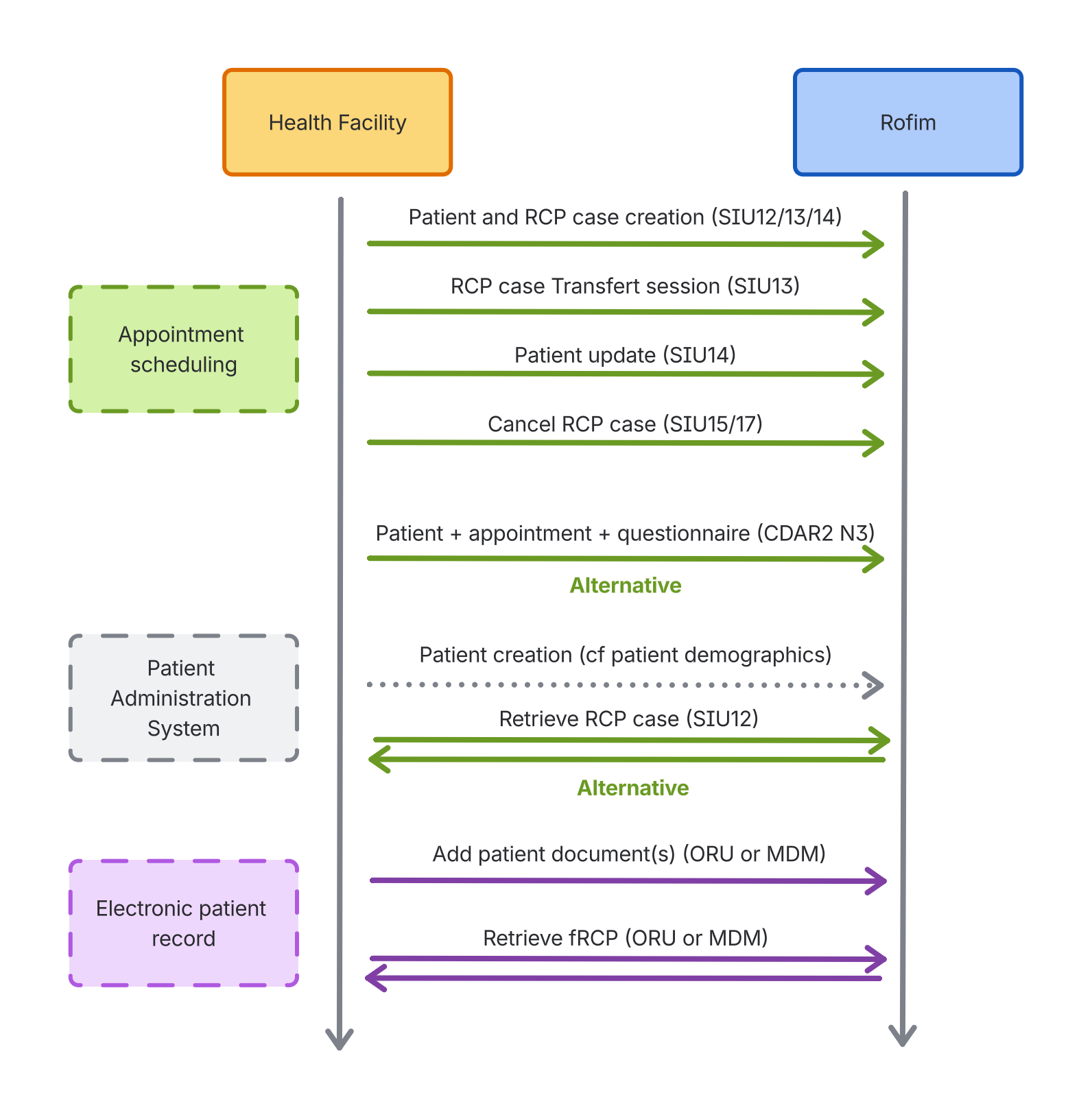
You can push a case into an MDM in three ways:
- Via an ims flow. The patient is then created in Rofim and can be scheduled by the secretariat into a session.
- Via an SIU flow. The patient is created if missing and is scheduled into an MDM session. The physician or secretariat must then fill in the clinical data in the Questionnaire (fRC).
- Via a CDAR2 N3 flow. The patient is created if missing, scheduled into an MDM session, and the data embedded in the
CDAR2 N3payload is used to populate the Questionnaire (fRC) automatically.
Scheduling a patient in an MDM
To route the case to the correct MDM session, Rofim must receive the pathway or family identifier in the incoming messages. The facility therefore needs a mapping between the Rofim pathway and family IDs and the appointments held in the EHR.
Via a CDAR2 N3
| Data | Value |
|---|---|
| Supported format | CDAR2 N3 |
| Supported inbound messages | CDAR2 N3 |
| Message type | POST |
| API endpoint | base_url/rcp/cdar2 |
Using a CDAR2 N3 flow lets you create the patient, add the case to the MDM session, and auto-fill the Questionnaire (fRCP).
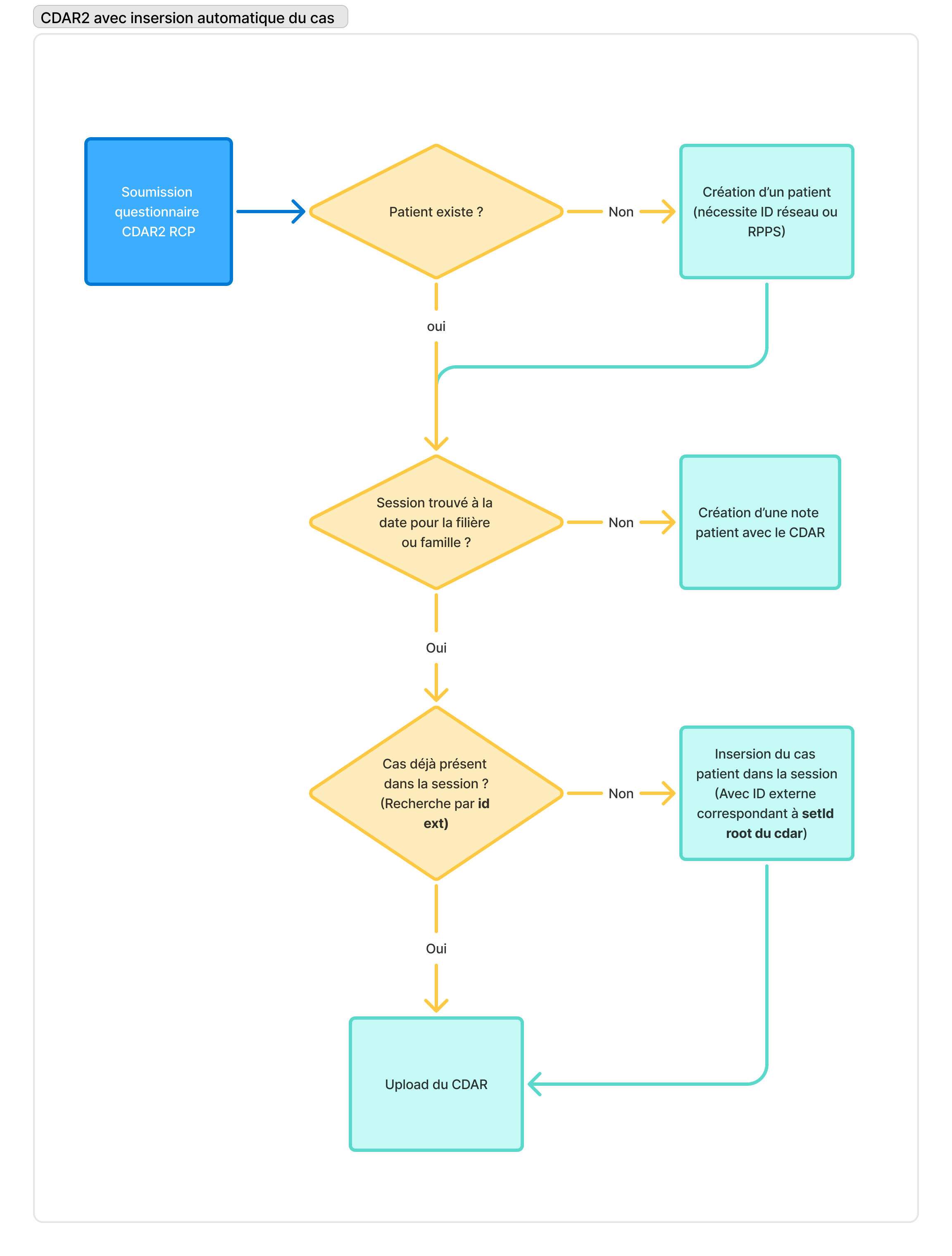
Prerequisites to insert a patient case into the session:
- The session already exists in Rofim.
- Only one session exists in the given family or pathway for the date provided in the questionnaire.
If the MDM session is not found on that date for the specified family or pathway, Rofim creates a patient note containing the CDAR2 questionnaire as an attachment. That lets you manually insert the patient into a session using that MDM questionnaire.
Case insertion flowchart (CDAR2)
The flowchart below details the steps needed to insert a case into a session.
Flowchart for inserting a patient case via CDAR2 N3
CDAR2 field reference
The table below lists the required elements, all of which live inside ClinicalDocument.
| Data | Field | Format | Required | Notes |
|---|---|---|---|---|
| Physician identifier (RPPS) | participant[typeCode='REFB'] .associatedEntity[classCode='PROV'] .id[root='1.2.250.1.71.4.2.1'] @extension | String | Yes | RPPS of the physician who submitted the case. Visible to MDM participants in Rofim and returned through the report retrieval interface. |
| MDM lead physician identifier (RPPS) | participant[typeCode='RESP'] .associatedEntity[classCode='PROV'] .id[root='1.2.250.1.71.4.2.1'] @extension | String | Yes | RPPS of the MDM lead physician. Visible to MDM participants in Rofim and returned through the report retrieval interface. |
| Department or service | component.componentOf .encompassingEncounter .id[@root='rofim.rcp.networkId'] @extension | String | Conditional | Rofim network ID. If present, the patient is created under that department or service. |
| Pathway or family ID | component.componentOf .encompassingEncounter .id[@root='rofim.rcp.famFilId'] @extension | String | Yes | ID of the family or pathway where the patient must be scheduled. |
| MDM start date | component.componentOf .encompassingEncounter .effectiveTime.low@value | Date | Yes | MDM session date (YYYYMMDD, for example 20190218). Used to place the case in the correct session. |
| Case unique identifier | setId@root | String | Yes | Case identifier defined on the facility side. Needed to update the case later. |
| Patient IPP/Patient ID | recordTarget.patientRole .id[@root='FINESS']@extension | String | Yes | Patient IPP/Patient ID within the facility. The id element’s root attribute must use the facility’s FINESS number. |
| Patient NSS | N/A | String | No | The national social security number cannot be populated through CDAR2 N3. |
| Patient INS | recordTarget.patientRole .id[@root='1.2.250.1.213.1.4.8'] @extension | String | No | The id element’s root attribute must be "1.2.250.1.213.1.4.8". |
| Patient given name | recordTarget.patientRole .patient.name.given | String | Yes | Patient first name. |
| Patient birth name | recordTarget.patientRole .patient.name .family[@qualifier='BR'] | String | Yes | Patient birth last name. |
| Patient usual name | recordTarget.patientRole .patient.name .family[@qualifier='SP'] | String | Yes | Patient current last name. |
| Patient sex | recordTarget.patientRole .patient .administrativeGenderCode | String | Yes | Expected values: M or F. |
| Patient date of birth | recordTarget.patientRole .patient .birthTime@value | Date | Yes | YYYYMMDD (for example 19730416). |
| Patient phone number | recordTarget.patientRole .telecom[@use='MC]@value | String | No | Uses the MC telecom entry. The number must follow the E.164 format, for example +33601010101. |
| Patient email address | recordTarget.patientRole .telecom@value | String | No | Populate when @value starts with mailto:. |
| Patient street address | recordTarget.patientRole .addr.streetName | String | Conditional | The address must be either fully populated or left blank (all PID.11.* fields provided together). |
| Patient postal code | recordTarget.patientRole .addr.postalCode | String | Conditional | |
| Patient city | recordTarget.patientRole .addr.city | String | Conditional | |
| Patient country | recordTarget.patientRole .addr.country | String | Conditional |
Localization
References such as FINESS numbers, French phone formats, and CDAR2 country codes reflect the French context and may require adaptation for other regions.
If the email or phone number format is invalid, the patient is rejected and the case is neither created nor scheduled in the MDM.
Via an SIU
| Data | Value |
|---|---|
| Supported format | HL7 2.5 to HL7 2.7 |
| Supported inbound messages |
|
| Message type | POST |
| API endpoint | base_url/rcp/siu |
The SIU flow creates the patient and adds the case to the MDM session. Any fields not detailed here (notably patient demographics) must comply with the Patient demographic data specification.
The SIU message must populate the following data:
| Data | Field | Format | Required | Notes |
|---|---|---|---|---|
| Case submitter identifier (RPPS) | AIP.3.1 | String | Yes | RPPS for the physician who submitted the case. Visible to MDM participants in Rofim and returned through the report retrieval interface. Taken from the first AIP segment (AIP.1 == 1). |
| Lead physician identifier (RPPS) | AIP.3.1 | String | No | RPPS for the lead physician. Visible to MDM participants in Rofim and returned through the report retrieval interface. Taken from the second AIP segment (AIP.1 == 2). |
| Department or service | AIL.3.9 | String | Conditional | Rofim network ID. If present, the patient is created under that department or service. |
| Pathway or family ID | AIL.3.4 | String | Yes | ID of the family or pathway where the patient must be scheduled. |
| MDM start date | SCH.11.4 | Date/Time | Yes | MDM start date and time in UTC. Only the date is used to assign the session (time is ignored). |
| Case unique identifier | SCH.2.1 | String | Yes | Case identifier defined on the facility side. |
MSH|^~\&|AXIGATE|AXIGATE|||20250408154719||SIU^S12^SIU_S12|43228|P|2.5|||||FR|8859/15|FRA
SCH|59384|59384||||RCP_IHU_P_CX_IH_67d443f1bdfe7d0fb1eabdd4^RCP -Infertilité|||15|Min|^^^20250408165500^20250408171000|||||||||10003425302^MANSION ADM^Fredéric ^^^^^^^L^^^RPPS|||||PLANNED
TQ1|1|||||15^Min|20250408165500|20250408171000|R
PID|||5100001073^^^^PI||TEST^TEST^^^M.^^L||19501104000000|M||||||||||||||||||||||N||PROV
PV1|1|O|8154||||||||||||||||
RGS|1
AIS|1||RCP_IHU_P_CX_IH_67d443f1bdfe7d0fb1eabdd4^RCP -Infertilité|20250408165500|0|Min|15|Min
AIL|1||8154^^^67d443f1bdfe7d0fb1eabdd4^^^^^67d441a5bdfe7d0fb1eaad51|||20250408165500|0|Min|15|Min
AIP|1||10100094977^Infertilité -^CO^^^^^^^L^^^RPPS|||20250408165500|||15|MinTODOTODOAttaching documents to the case
| Data | Value |
|---|---|
| Supported format | HL7 2.5 to HL7 2.7 |
| Supported inbound messages | ORU, MDM, or OUL |
| Message type | POST |
| API endpoint | base_url/rcp/doc |
Documents are added to a patient note and can be viewed during the MDM.
Key data
The table below lists the expected SIU field mapping:
| Data | Field | Format | Required | Notes |
|---|---|---|---|---|
| Case unique identifier | PV1.50.1 | String | No | Case identifier in the MDM where the document must be attached. Must match SCH.2.1 in the SIU flow or the setId.@root value when created via CDAR2 N3. |
| File name | OBX.3.1 | String | Yes | Display name shown in Rofim. |
| Department or network identifier | MSH.5.1 | String | Conditional | Service or network identifier. Must match the value used when the patient was created. |
| Patient IPP/Patient ID | PID.3.1 | String | Yes | Use PID.3.1 when PID.3.5='PI'. Must match the patient's IPP/Patient ID. |
| File | OBX.5.5 | String | Yes | OBX.5.5 when OBX.2.1 equals any of:
|
N/A | OBX.5.1 | String | Yes | Not used. |
N/A | OBX.5.2 | String | Yes | Must be Application. |
N/A | OBX.5.3 | String | Yes | Must be PDF. |
N/A | OBX.5.4 | String | Yes | Must be Base64. |
| Unique document identifier | TXA.12 | String | No | Lets you overwrite an earlier document version. |
If theCase unique identifierfield is missing, the document is stored in a new patient note instead. A clinician must then manually attach it to the MDM case.
Message examples
MSH|^~\&|DaVinci|MIPS|665458c6e55fcb3ce37040c6|MIPS|20250325141632||OUL^R22|P25006368_20250325141632|P|2.5||||||8859/15
EVN||20250325141632|20250325141632
PID|1||2345^^^LIS||XXXX^XXXXX||19600829|F|||&XXXXX^^XXXXXX^^12345|||||||2345678765||||||||||||N
PV1||I|||||||||||||||||125146142
ORC|SC||P25/006368||CM||^^^20250317143845^^R||20250325141632|||CRUN^CRUTU^XXXXXX-XXXXX||||20250314135522|||R
OBR|1|^DAVINCI|P25/006368^20250320140758|HIS_PDFReport^^Glims^HIS_PDFReport^^DaVinci||20250313135500|20250314135542|20250325092717||||||||CRUN^CRUTU^XXXXXX-XXXXXX|||||||||F|||||||XXXX&XXXXX&XXXXX
OBX|1|ED|HIS_PDFReport^^DaVinci^HIS_PDFReport^^DaVinci||JVBERi0xLjQNJeLjz9MNMSAwIG9iago8PAovVHlwZS9FeHRHU3RhdGUKL1NBIGZhbHNlCi9TTSAwLjAyCi9UUjIgL0RlZmF1bHQKPj4KZW5kb2JqCjIgMCBvYmoKWy9EZXZpY2VSR0JdCmVuZG9iagozIDAgb2JqCjw8L0ZpbHRlci9GbGF0ZURlY29kZS9MZW5ndGggMzI0Nz4+CnN0cmVhbQp42r1b244juQ1976/wD9iju6qAhQG32x0kb0EGyEOQp002T9lgMv8PhBRJiaqSbXmSDQaYrtaVIg8PqUt/+d2f7OEf39++XOHnz9/fvsE/.......vSW5mbyAzNiAwIFIKPj4Kc3RhcnR4cmVmCjE1NDk3MAolJUVPRgo=||||||F|||20250325092717TODOTODORetrieving MDM reports
| Data | Value |
|---|---|
| Supported format | HL7 2.7 |
| Supported outbound messages | MDM or ORU |
| Message type | GET |
| API endpoint | base_url/rcp/report/retreive |
Each completed case generates a Questionnaire (fRCP) that the EHR can retrieve. The endpoint returns every report added since the previous call.
Responses consist of an XML file containing every HL7 message encoded in base 64. The XML structure is:
<message>
  <content>HL7 ORU or MDM #1 encoded in B64</content>
  <content>HL7 ORU or MDM #2 encoded in B64</content>
  <content>HL7 ORU or MDM #3 encoded in B64</content>
  ...
</message>
The MDM or ORU message contains the Questionnaire (fRCP) PDF encoded in base 64, plus additional metadata that simplifies downstream processing in the EHR. Key fields are listed below.
Key data
| Data | Field | Format | Required | Notes |
|---|---|---|---|---|
| Case submitter identifier | PV1.7 | String | Yes | Populated with the first and last name plus RPPS of the physician who submitted the case to the MDM session. |
| Lead physician identifier | PV1.8 | String | Yes | Populated with the first and last name plus RPPS of the lead physician for the MDM session. |
| Unique document identifier | TXA.12 | Structure | Yes | MDM reports can be updated and delivered multiple times (for example when the questionnaire changes). The TXA.12 field identifies the document being updated. Format:
|
| MDM label | TXA.13 | Structure | Yes | Provides the session label, which can help customize file naming. Format:
|
Message example
<?xml version="1.0" encoding="UTF-8"?>
<message>
  <content>
    TVNIfF5+XCZ8Uk9GSU18Uk9GSU18QVhJR0FURXxBWElHQVRFfDIwMjUwNDAxMTMwNTAyfHxNRE1e...d016UUtKU1ZGVDBZS3x8fHx8fEZ8fHwyMDI1MDQwMTEzMDUwMg==
  </content>
  <content>
    TVNIfF5+XCZ8Uk9GSU18Uk9GSU18QVhJR0FURXxBWElHQVRFfDIwMjUwNDAxMTMwNTAyfHxNRE1e...d016UUtKU1ZGVDBZS3x8fHx8fEZ8fHwyMDI1MDQwMTEzMDUwMg==
  </content>
</message>
<?xml version="1.0" encoding="UTF-8"?>
<message/>MSH|^~\&|ROFIM|ROFIM|AXIGATE|AXIGATE|20250401130502||MDM^T02^MDM_T02|3840|P|2.5|||||FRA|UTF-8|FRA
EVN|T02|20250401130502
PID|1||2100054546^^^APHM IPP^PI||DUPONZZZ^FFFICTIF||19341010|M|||^^^^^||^^^||||||NC||||
PV1|1|O|||||10102078838^Audrey^Médecin^^^^^^ASIP-SANTE-PS&1.2.250.1.71.4.2.1&ISO^D^^^RPPS
TXA|1|CR|PDF|20250401130502||20250401130502|20250401130502|20250401130502||||FRCP_ID^ROFIM^67da8696f56896e0720d8bcf^UIID|RCP_NAME^ROFIM^3C - Dermatologie - Oncologie cutanée^L|||rcp_questionnaire_DUPONZZZ-F_01042025.pdf|AU||AV
OBX|1|ED|CR^rcp_questionnaire_DUPONZZZ-F_01042025.pdf||rcp_questionnaire_DUPONZZZ-F_01042025.pdf^^CR^Base64^JVBERi0xLjQKJdPr6eEKMSAwIG9iago8PC9UaXRsZSAoYWJvdXQ6YmxhbmspCi9DcmVhdG9yIChNb3ppbGxhLzUuMCBcKFgxMTsgTGludXggeDg2XzY0XCkgQXBwbGVXZWJLaXQvNTM3LjM2IFwoS0hUTUwsIGxpa2UgR2Vja29cKSBIZWFkbGVzc0Nocm9tZS8xMzQuMC4wLjAgU2FmYXJpLzUzNy4zNikKL1Byb2R1Y2VyIChTa2lhL1BERiBtMTM0KQovQ3JlYXRpb25EYXRlIChEOjIwMjUwNDAxMTEwNTAxKzAwJzAwJykKL01vZERhdGUgKEQ6MjAyNTA0MDExMTA1MDErMDAnMDAnKT4+CmVuZG9iagozIDAgb2JqCjw8L2NhIDEKL0JNIC9Ob3JtYWw+PgplbmRvYmoKNiAwIG9iago8PC9DQSAxCi9jYSAxCi9MQyAwCi9MSiAwCi9MVyAxCi9NTCA0Ci9TQSB0cnVlCi9CTSAvTm9ybWFsPj4KZW5kb2JqCjEwIDAgb2JqCjw8L04gMwovRmlsdGVyIC9GbGF0ZURlY29kZQovTGVuZ3RoIDI5Nj4.....gMTIyIDAgUgovSW5mbyAxIDAgUj4+CnN0YXJ0eHJlZgoxMzIwMzQKJSVFT0YK||||||F|||20250401130502Updated 6 months ago